The difference between a two-hour CTF challenge and a five-minute one is usually a single tool you didn't know about:
zsteg on a suspicious PNG, CyberChef's Magic operation on a string of gibberish, strings on a binary
before you ever open Ghidra. This list of CTF tools is sorted by challenge category, with the command you
will actually type first for each one.
Everything here is free and most of it ships with Kali Linux. New to CTFs? Read our CTF for beginners guide first. When you want somewhere to try the tools, every challenge in the HackerDNA challenge library runs in the browser, with no VPN to configure.
TL;DR: The CTF tools that matter most are free: browser DevTools, Burp Suite Community and CyberChef for web and encodings, file, strings, binwalk and steghide for forensics, Ghidra for reversing and pwntools for exploitation. Kali Linux ships almost all of them. Learn one tool per category well before adding more.
What Are CTF Tools?
CTF tools are software applications and utilities designed to help solve Capture The Flag challenges. These range from simple encoding converters to sophisticated reverse engineering suites. The right tool can turn an hours-long challenge into a five-minute solve.
CTF competitions test skills across multiple domains: web security, cryptography, forensics, reverse engineering, binary exploitation, and OSINT. Each category requires specialized tools. A web exploitation challenge might need an HTTP proxy, while a forensics challenge requires file analysis utilities.
The good news: most essential CTF tools are free and open source. Many come pre-installed on security-focused Linux distributions like Kali Linux. You don't need expensive software to compete effectively.
Setting Up Your CTF Environment
Before installing individual tools, set up a proper CTF environment. The foundation matters as much as the tools themselves.
Option 1: Kali Linux (Recommended)
Kali Linux is a Debian-based distribution designed for penetration testing and security research. It comes with hundreds of pre-installed tools, making it the most popular choice for CTF competitors.
- VirtualBox/VMware: Run Kali as a virtual machine on your main OS. Allocate at least 4GB RAM and 50GB disk.
- WSL2: Windows users can run Kali in Windows Subsystem for Linux for lightweight access.
- Bare metal: Install directly on dedicated hardware for best performance.
Option 2: ParrotOS Security
ParrotOS is a lighter alternative to Kali with similar tooling. It uses fewer resources, making it better for older hardware or smaller virtual machines.
Option 3: Custom Setup
You can build a CTF environment on any Linux distribution by installing tools manually. This gives you more control but requires more setup time. Ubuntu or Debian work well as base systems.
Essential first steps after setup:
- Run
sudo apt update && sudo apt upgradeto get latest packages - Install Python 3 pip:
sudo apt install python3-pip - Unzip the RockYou wordlist, which Kali ships compressed:
sudo gunzip /usr/share/wordlists/rockyou.txt.gz - Create a
~/ctfdirectory to organize challenge files - Set up a note-taking system (Obsidian, Notion, or simple markdown files)
Web Exploitation Tools
Web challenges are the most common CTF category and often the most accessible for beginners. These tools help you find and exploit vulnerabilities in web applications.
Burp Suite
Burp Suite is the industry-standard web application security testing platform. The free Community Edition handles most CTF challenges perfectly. Use it to intercept, modify, and replay HTTP requests.
- Proxy: Intercept browser traffic to see exactly what's being sent
- Repeater: Modify and resend requests to test different payloads
- Intruder: Automate attacks like brute forcing parameters (rate-limited in the free Community Edition)
- Decoder: Encode and decode data in various formats
Installation: Pre-installed on Kali. Otherwise, download from PortSwigger.
Browser Developer Tools
Every browser has built-in developer tools that are essential for web CTF challenges. Learn the keyboard shortcuts for Chrome (F12) or Firefox (F12).
- Elements: Inspect and modify HTML/CSS in real time
- Console: Execute JavaScript and see errors
- Network: Monitor all HTTP requests and responses
- Storage: View and edit cookies, localStorage, sessionStorage
SQLMap
SQLMap automates SQL injection detection and exploitation. Point it at a vulnerable parameter, and it handles the rest, including database enumeration and data extraction.
# Basic SQL injection test
sqlmap -u "http://target.example/page?id=1" --dbs

# POST request with form data
sqlmap -u "http://target.example/login" --data="user=admin&pass=test" --dbs
Additional Web Tools
Nikto
Web server scanner that checks for dangerous files, outdated software, and misconfigurations.
nikto -h http://target.example
Gobuster / Dirbuster
Directory and file brute-forcing tools to find hidden content on web servers.
gobuster dir -u http://target.example -w /usr/share/wordlists/dirb/common.txt
curl / wget
Command-line HTTP clients for quick requests and downloads. Essential for scripting.
curl -X POST http://target.example/api -d '{"key":"value"}'
Postman
GUI tool for API testing. Easier than curl for complex API interactions.
Master these techniques with hands-on practice in the Web Application Security course, which covers SQL injection, XSS, CSRF, and more with practical exercises.
Cryptography Tools
Crypto challenges range from simple encoding puzzles to complex mathematical attacks. These tools help you identify, analyze, and break various encryption schemes.
CyberChef
CyberChef is the "Swiss Army knife" for data manipulation. This web-based tool chains together operations for encoding, decoding, encryption, compression, and data analysis. Bookmark gchq.github.io/CyberChef immediately.
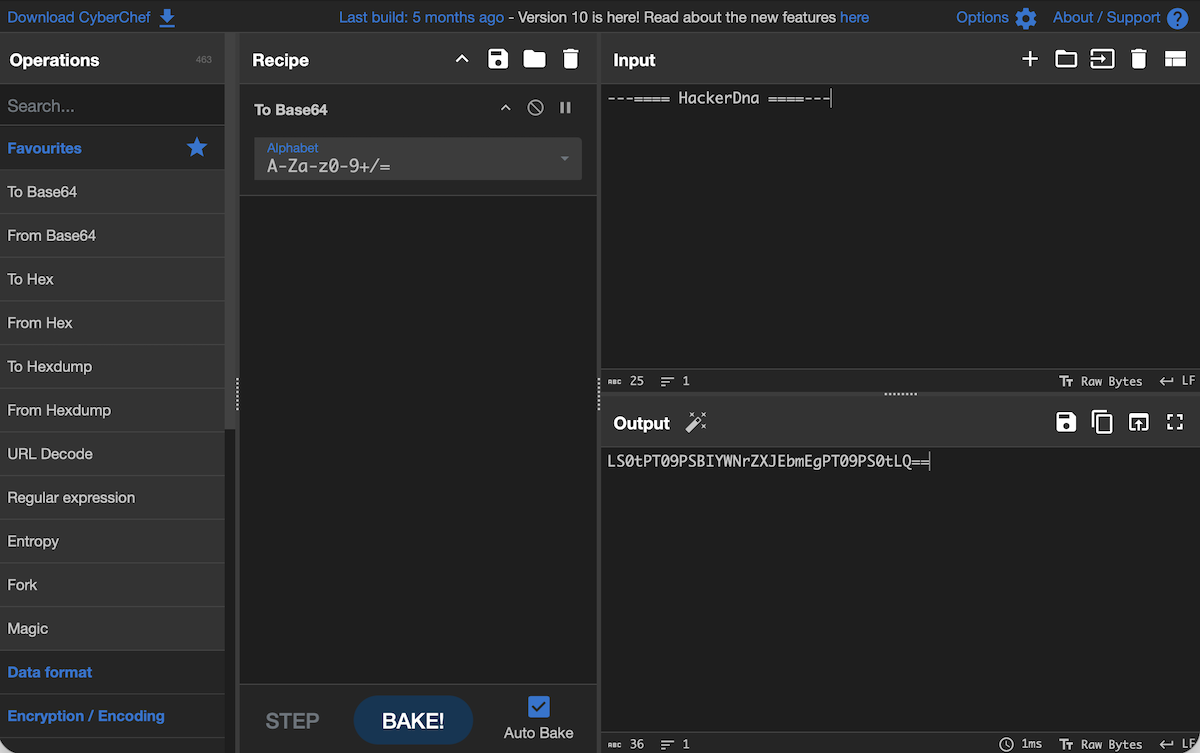
CyberChef excels at identifying unknown encodings. If you see strange text, drag it into CyberChef and try the "Magic" operation, which automatically detects and decodes common formats. Our full walkthrough of how to use CyberChef covers the interface, layered recipes, and the Flow control operations most beginners never find.
- Base64, hex, URL encoding/decoding
- ROT13 and other Caesar cipher variants
- XOR operations with key guessing
- Hashing (MD5, SHA1, SHA256)
- Compression and decompression
For a quick one-off decode you don't even need a recipe: our free Base64 decoder handles the most common layer in beginner crypto challenges.
Hashcat and John the Ripper
When you encounter password hashes, these tools crack them using wordlists, rules, and brute force attacks. Hashcat uses GPU acceleration for faster cracking.
# John the Ripper - crack shadow file
john --wordlist=/usr/share/wordlists/rockyou.txt shadow.txt

# Hashcat - crack MD5 hashes
hashcat -m 0 -a 0 hashes.txt /usr/share/wordlists/rockyou.txt
Learn advanced cracking techniques in our Password Cracking course.
dCode.fr
dCode.fr is an online platform with solvers for dozens of classical ciphers: Vigenere, Playfair, Enigma, substitution ciphers, and more. When you identify a cipher type, dCode often has an automatic solver.
Python Cryptography Libraries
For custom crypto challenges, Python with the right libraries is essential:
- pycryptodome: Full-featured cryptographic library
- gmpy2: Fast arbitrary precision arithmetic for RSA attacks
- sympy: Symbolic mathematics for number theory
- z3-solver: SMT solver for constraint-based crypto challenges
# Install crypto libraries
pip3 install pycryptodome gmpy2 sympy z3-solver
Pro tip: When facing an unknown cipher, first check if it's a simple encoding (Base64, hex). Use CyberChef's Magic operation. If that fails, analyze letter frequency for substitution ciphers.
Forensics and Steganography Tools
Forensics challenges involve analyzing files, disk images, memory dumps, and network captures to find hidden data. Steganography specifically deals with data hidden within images, audio, or other files.
File Analysis Basics
file
Identifies file types by analyzing magic bytes, not extensions.
file mystery_file
strings
Extracts printable text from binary files. Quick way to find hidden messages.
strings -n 8 file | grep -i flag
xxd / hexdump
View raw file contents in hexadecimal. Essential for understanding file structures.
xxd file | head -50
binwalk
Analyzes and extracts embedded files from binaries, firmware, and images.
binwalk -e suspicious_image.png
Steganography Tools
Steganography hides data within innocent-looking files. These tools reveal hidden content, and our steganography guide walks through the detection workflow they belong to:
-
Steghide: Extracts data hidden in JPEG, BMP, WAV and AU files. Try an empty passphrase first (just press Enter), then let stegseek crack it against a wordlist in seconds:
steghide extract -sf image.jpgthenstegseek image.jpg rockyou.txt -
zsteg: Detects hidden data in PNG and BMP files using various bit extraction methods:
zsteg image.png - StegSolve: Java-based image analyzer that applies various filters and bit-plane analysis. Essential for visual stego.
- Audacity: Audio editor for analyzing spectrograms. Hidden messages often appear visually in spectrogram view.
-
exiftool: Extracts metadata from images, PDFs, and documents. Flags sometimes hide in EXIF data:
exiftool image.jpg
Network Forensics
Wireshark is the standard tool for analyzing network packet captures (PCAP files). It displays captured traffic in a readable format and lets you filter, search, and follow TCP streams.
# Useful Wireshark filters
http.request.method == "POST"
tcp contains "flag"
ip.addr == 192.168.1.1
Memory Forensics
Volatility 3 (the vol command) analyzes memory dumps from Windows, Linux, and macOS systems. It
can extract running processes, network connections, command history, and files held in memory. Volatility 2 and its
--profile syntax are no longer maintained, so ignore older write-ups that use them.
# Identify the OS and build
vol -f memory.dmp windows.info
# List running processes
vol -f memory.dmp windows.pslist
# Dump the files held in memory by one process
vol -f memory.dmp -o output/ windows.dumpfiles --pid 1234
Practice these techniques on real forensics challenges. HackerDNA's forensics and steganography challenges put these tools to work on real files.
Reverse Engineering Tools
Reverse engineering challenges provide compiled binaries and ask you to understand their logic to find flags. This requires analyzing assembly code and program behavior.
Ghidra
Ghidra is a free, open-source reverse engineering suite developed by the NSA. It includes a powerful disassembler and decompiler that converts assembly back to readable C-like pseudocode.
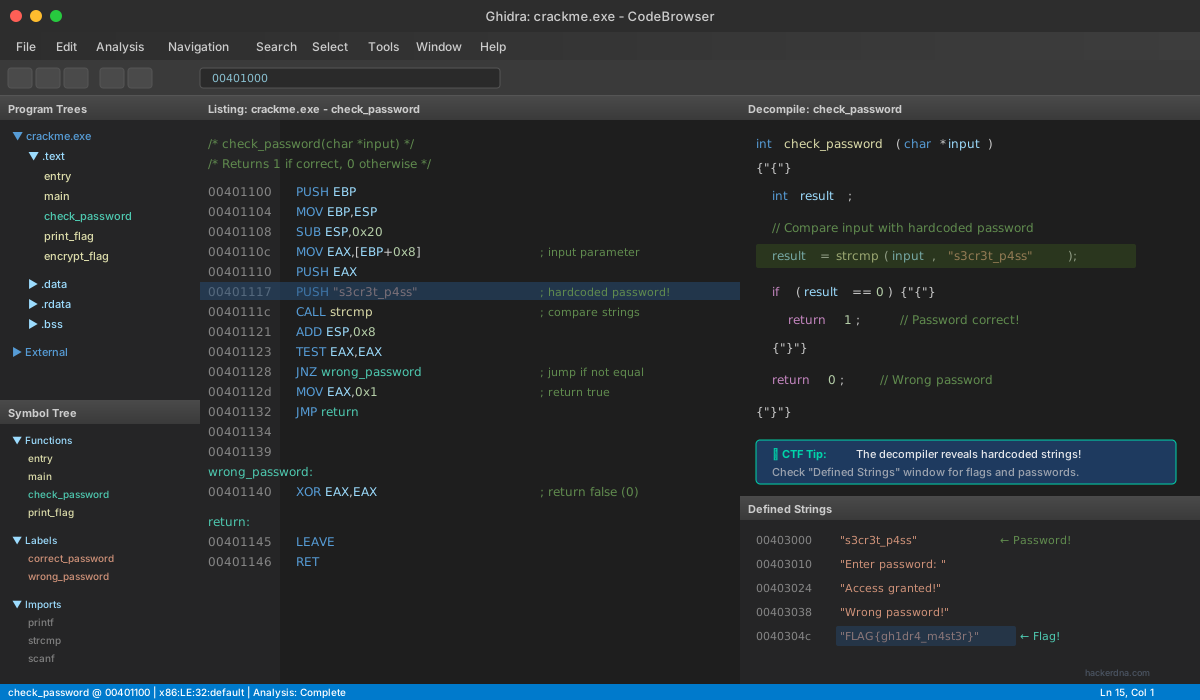
- Supports x86, x64, ARM, MIPS, and more architectures
- Decompiler produces readable code from assembly
- Scripting support in Java and Python
- Free alternative to expensive tools like IDA Pro
Installation: Download from ghidra-sre.org. Requires a 64-bit JDK 21 or newer.
radare2 and Cutter
radare2 (r2) is a powerful command-line reverse engineering framework. Cutter provides a GUI frontend that makes r2 more accessible to beginners.
# Open binary in radare2
r2 ./binary

# Common commands
aaa          # Analyze all
pdf @ main   # Print disassembly of main function
s main       # Seek to main
VV           # Visual mode graph
Disassemblers and Decompilers
objdump
Basic disassembler included in most Linux systems.
objdump -d binary | less
gdb
GNU Debugger for dynamic analysis. Run binaries step-by-step.
gdb ./binary
ltrace / strace
Trace library and system calls. Quick way to see what a program does.
ltrace ./binary
jadx
Decompiles Android APK files back to Java source code.
Beginner tip: Start with strings and ltrace
before opening heavy tools like Ghidra. Many CTF binaries have simple string comparisons
that reveal the flag without deep analysis.
Binary Exploitation Tools
Binary exploitation (pwn) challenges involve finding and exploiting memory corruption vulnerabilities like buffer overflows and format string bugs. This is an advanced category requiring solid C and assembly knowledge.
pwntools
pwntools is a Python library designed specifically for CTF exploitation. It simplifies crafting payloads, interacting with processes, and building exploits.
from pwn import *

# Connect to remote challenge
p = remote('challenge.ctf.example', 1337)

# Send payload with padding
payload = b'A' * 64 + p64(0xdeadbeef)
p.sendline(payload)

# Receive flag
print(p.recvall())
Installation: pip3 install pwntools
GDB with pwndbg/GEF
Stock GDB is difficult to use for exploitation. Install pwndbg or GEF (GDB Enhanced Features) for context displays, heap analysis, and exploit development helpers.
- pwndbg: github.com/pwndbg/pwndbg
- GEF: github.com/hugsy/gef
ROPgadget and ropper
Return-Oriented Programming (ROP) exploits require finding gadgets in binaries. These tools automatically discover usable ROP gadgets.
# Find all gadgets
ROPgadget --binary ./vuln

# Search for specific gadget
ROPgadget --binary ./vuln --search "pop rdi"
checksec
Before exploiting a binary, check what protections are enabled. checksec (bundled with pwntools as
pwn checksec) shows RELRO, stack canaries, NX, PIE, and other mitigations.
pwn checksec ./binary
# Output lists: Arch, RELRO, Stack, NX, PIE
OSINT and Reconnaissance Tools
Open Source Intelligence (OSINT) challenges require finding information from public sources. Reconnaissance tools also help in challenges that involve discovering hidden services or content.
Search and Discovery
-
Google Dorks: Advanced search operators to find specific content. Learn operators like
site:,filetype:,intitle:,inurl:. - Shodan: Search engine for internet-connected devices. Finds servers, webcams, and IoT devices.
- Wayback Machine: archive.org stores historical snapshots of websites. Find deleted content.
- Reverse Image Search: Google Images, TinEye, and Yandex help identify locations and origins of images.
Network Reconnaissance
Nmap
The essential network scanner. Discover hosts, open ports, and running services.
nmap -sC -sV -T4 target.example
dig / nslookup
DNS lookup tools for discovering subdomains and mail servers.
dig target.example MX
whois
Domain registration information including owner details and name servers.
whois target.example
subfinder / amass
Subdomain enumeration tools that discover hidden subdomains from various sources.
subfinder -d target.example
Network reconnaissance is often the first step in CTF challenges that involve real machines rather than just web applications or puzzles.
Python: Your Most Versatile CTF Tool
Python is arguably the single most important tool in any CTF competitor's arsenal. When existing tools don't solve your problem, Python lets you build custom solutions quickly.
Essential Libraries
# Install common CTF libraries
pip3 install requests beautifulsoup4 pwntools pycryptodome pillow| Library | Use Case |
|---|---|
requests |
HTTP requests and web automation |
pwntools |
Exploit development and binary interaction |
pycryptodome |
Cryptographic operations |
beautifulsoup4 |
HTML parsing and web scraping |
Pillow |
Image manipulation for stego challenges |
z3-solver |
Constraint solving for reverse engineering |
angr |
Symbolic execution for binary analysis |
Common Python Patterns
# Quick web request with session
import requests
s = requests.Session()
r = s.post('http://target.example/login', data={'user': 'admin', 'pass': 'test'})
print(r.text)

# Brute force a parameter
for i in range(1000):
    r = requests.get(f'http://target.example/page?id={i}')
    if 'flag' in r.text:
        print(f'Found at id={i}: {r.text}')
        break

# XOR decode
def xor_bytes(data, key):
    return bytes([b ^ key[i % len(key)] for i, b in enumerate(data)])
Building Your CTF Toolkit
Don't install everything at once. Build your CTF toolkit gradually based on the challenges you encounter. The best tools for CTF are the ones you actually know how to use. Here's a recommended progression:
- Week 1: Foundation Set up Kali Linux VM. Learn browser DevTools and CyberChef. Complete a few beginner web challenges.
- Week 2: Web Exploitation Install Burp Suite. Practice intercepting requests. Learn SQLMap basics.
- Week 3: Forensics Master file, strings, binwalk, exiftool. Install steghide and zsteg for image stego.
- Week 4: Crypto Basics Learn CyberChef deeply. Install hashcat and practice hash cracking with RockYou wordlist.
- Month 2: Reverse Engineering Install Ghidra. Start with simple crackme challenges. Learn basic x86 assembly.
- Month 3: Binary Exploitation Install pwntools and pwndbg. Study buffer overflows. Practice on simple pwn challenges.
Tool overload is real. Having 50 tools you don't know how to use is worse than having 10 tools you've mastered. Focus on learning each tool deeply before adding more to your arsenal.
Quick Reference: CTF Toolkit by Category
Use this table as a quick reference for your CTF toolkit. Essential tools get you started, while advanced tools help you tackle harder challenges.
| Category | Essential Tools | Advanced Tools |
|---|---|---|
| Web | Burp Suite, DevTools, curl | SQLMap, Nikto, ffuf |
| Crypto | CyberChef, dCode.fr, hashcat | SageMath, z3-solver, gmpy2 |
| Forensics | file, strings, binwalk, exiftool | Volatility, Autopsy, FTK |
| Stego | steghide, zsteg, StegSolve | Audacity, OpenStego, stegseek |
| Reversing | Ghidra, strings, ltrace | radare2, IDA Pro, angr |
| Pwn | pwntools, gdb+pwndbg, checksec | ROPgadget, one_gadget, libc-database |
| OSINT | Google, Wayback, whois | Shodan, Maltego, theHarvester |
Legal and Ethical Considerations
CTF tools are designed for security research and authorized testing. Using them irresponsibly or illegally can result in serious consequences.
Critical reminder: Only use these tools on systems you own or have explicit written permission to test. CTF platforms provide legal environments to practice. Never scan or attack real systems without authorization.
- CTF competitions provide legal, safe environments to practice hacking skills
- Using exploitation tools against unauthorized targets is illegal in most countries
- Many tools can cause damage or disruption if used carelessly
- Respect the rules of each CTF platform you participate in
- Share knowledge responsibly through writeups after competitions end
Practice safely on authorized platforms like HackerDNA, where you can use all these tools legally on intentionally vulnerable machines.
Frequently Asked Questions
What is the best tool for CTF beginners?
CyberChef is the most versatile beginner tool. It handles encoding, decoding, and data manipulation without any installation. Pair it with browser DevTools for web challenges, and you can solve many beginner CTF problems.
Do I need Kali Linux for CTF?
Kali Linux is not required but highly recommended. It comes with most CTF tools pre-installed, saving hours of setup time. You can run it as a virtual machine alongside your regular OS.
Are CTF tools free?
Most essential CTF tools are free and open source. Ghidra, Burp Suite Community, Wireshark, and the entire Kali Linux toolkit are free. Professional tools like IDA Pro and Burp Suite Professional exist but aren't necessary for CTF competitions.
How do I learn to use these tools?
The best way to learn CTF tools is by solving challenges. Start with beginner-friendly platforms, read writeups when stuck, and practice consistently. Each tool becomes intuitive after you've used it to solve real problems.
What tools do professional pentesters use?
Professional penetration testers use many of the same tools covered here: Burp Suite, Nmap, Metasploit, Ghidra, and Python scripts. CTF practice directly translates to professional skills. The main difference is scope and methodology, not tooling.
Start Building Your Toolkit Today
The CTF tools above cover every category you will meet, but you only need three to start: DevTools, CyberChef and a Linux shell. Add the rest the first time a challenge actually needs them, and you will remember how they work.
Today: Bookmark CyberChef and solve one challenge with nothing but your browser.
This week: Solve five beginner challenges using only DevTools, Burp Suite and CyberChef.
This month: Add the forensics and crypto tools as you meet those challenge types.
Put your toolkit to use in the HackerDNA challenge library: start with the Capture the Flag 101 lab to learn the platform, then work through web, crypto and forensics challenges in your browser. Start with HackerDNA's free tier - no credit card required.
More CTF guides: